
Did you see recent post with thumbnail? If yes then you definitely want to add in your blog. Yes you can.
Here are step for that.
1. Log in to your Blogger account.
2. Click Layout >> Page Element.
3. Click on Add Gadget and add below code in it.
<script language="JavaScript">
imgr = new Array();
imgr[0] = "http://img195.imageshack.us/img195/7350/blocko.gif";
imgr[1] = "http://img195.imageshack.us/img195/7350/blocko.gif";
imgr[2] = "http://img195.imageshack.us/img195/7350/blocko.gif";
imgr[3] = "http://img195.imageshack.us/img195/7350/blocko.gif";
imgr[4] = "http://img195.imageshack.us/img195/7350/blocko.gif";
showRandomImg = true;
boxwidth = 298;
cellspacing = 8;
borderColor = "#000000";
bgTD = "#000000";
thumbwidth = 40;
thumbheight = 40;
fntsize = 12;
acolor = "#666";
aBold = true;
icon = " ";
text = "comments";
showPostDate = false;
summaryPost = 40;
summaryFontsize = 10;
summaryColor = "#666";
icon2 = " ";
numposts = 7;
home_page = "http://.blogspot.com/";
</script>
<script src="http://socheate.googlepages.com/recentposts_thumbnail.js" type="text/javascript"></script>
Change green text with your choice of height and width and blue text with your blog name like http://yourname.blogspot.com
4. Move your Widget as your choice and save it. You are done.
What is next to do?
If you didn't subscribe at then do it now. So, you will not loose any update on this blog.
Recent Post Thumbnails Widget - Blogger Tweak


How to make Label Scroll Up
LABEL
- Scripts- gAjax RSS Pausing Scroller (hosted)
- Audio Player Blogspot & Wordpress
- How to Add a Shortcut Icon to a Web Page
- How do I put a picture into the caption of a picture on Website
- How to get your blog indexed by Google faster?
- How to check if my blog already get index by Google?
- how to Add "Read More" in blogger!
- How to add MyBlogLog comment avatars (author images) to your comments section
- Easy way to setup CO.CC domain in Blogger
- Labels into Horizontal Tabs - A Blogger Hack
- How To Put An Icon On Your Browser URL Address Bar favicon.ico
- How to add comment avatars (author images) to your comments section
- How to Display Labels in a Drop Down Menu (Useful Blogger Tip)
- Change your Sidebar
- Related Posts Widget For Blogger with CSS
- Page Navigation Hack for Blogger
- Error code bX-jdokxi - i can't change my template!
- Unicode Khmer can use even without font?
- Text Codes
- Changing the Windows Boot Screen with...
- How can I make Khmer Font (Limon or ABC) can be Used in the Blog?
- How to add Background in the Comment form
- how to put Picture or Flash to your head Blog
- How can I create expandable post summaries
Login => Layout => Edit HTML => (tick on) Expand Widget Templates => (find out the word Label) see like this:
<b:widget id='Label1' locked='false' title='Labels' type='Label'>
<b:includable id='main'>
<b:if cond='data:title'>
<h2><data:title/></h2>
</b:if>
<div class='widget-content'>
Then Add Code:
Add below:
<b:widget id='Label1' locked='false' title='Labels' type='Label'>
<b:includable id='main'>
<b:if cond='data:title'>
<h2><data:title/></h2>
</b:if>
<div class='widget-content'>
<div style='border: 1px solid rgb(238, 238, 238); padding: 8px; overflow: auto; width: 140px; height: 250px; margin-right: 10px; float: left;'>
<ul>
<b:loop values='data:labels' var='label'>
<li>
<b:if cond='data:blog.url == data:label.url'>
<span expr:dir='data:blog.languageDirection'>
<data:label.name/>
</span>
<b:else/>
<a expr:dir='data:blog.languageDirection' expr:href='data:label.url'>
<data:label.name/>
</a>
</b:if>
</li>
</b:loop>
</ul>
<b:include name='quickedit'/>
</div></div>
----------------
Done!
Labels into Horizontal Tabs - A Blogger Hack
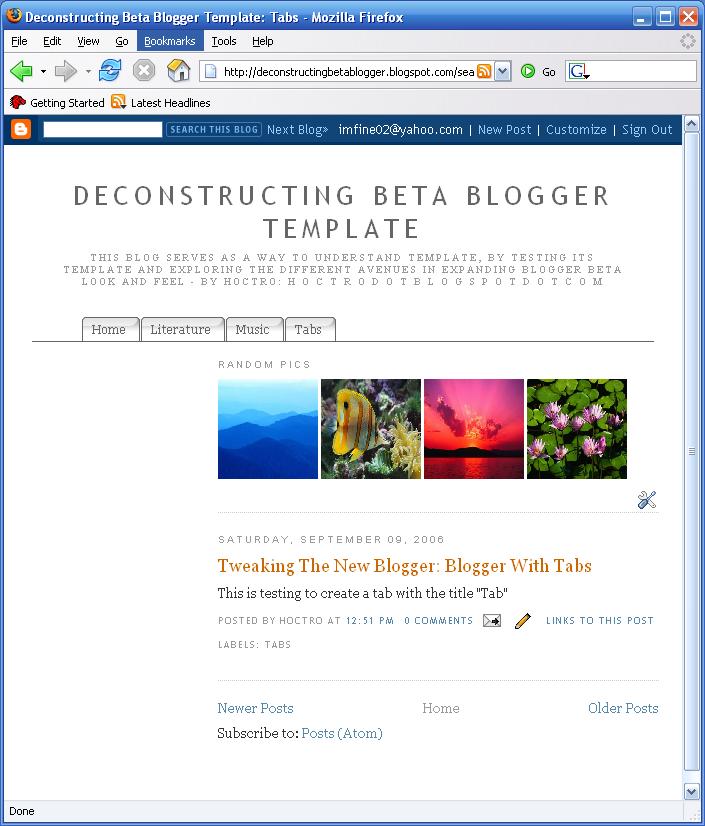
Step 0: Label your posts.
Make sure your blog has some posts with label assigned, otherwise nothing will get created. See this topic on how to create labels:
http://help.blogger.com/bin/answer.py?answer=44498&topic=9084

Step 1: Downloading and unzipping the file from the Exploding Boy website
Here are the downloading and sample links:
http://www.exploding-boy.com/2005/12/15/free-css-navigation-designs/
http://exploding-boy.com/images/cssmenus/menus.html
Then, have a googlepages account and upload the pics there.
Step 2: Changing the Header to become appendable.
Modify this line:
<b:section class="header" id="header" maxwidgets="1" showaddelement="no">
to become
<b:section class="header" id="header" maxwidgets="2" showaddelement="yes">
Step 3: Prepare the CSS portion of the hack.
Go to the very end of this article and cut the CSS portion you like there, then paste it at the very end of the CSS code (right before the closing CDATA part - see picture below)
Make sure to replace "www.yourwebsite.com" to your website.

Below is an example of pasting the code for style F:
/*- Menu Tabs F By http://www.exploding-boy.com/2005/12/15/free-css-navigation-designs/------
*/
#tabsF {
float:left;
width:100%;
font-size:80%;
line-height:normal;
border-bottom:1px solid #000;
}
#tabsF ul {
margin:0;
padding:10px 10px 0 50px;
list-style:none;
}
#tabsF li {
display:inline;
margin:0;
padding:0;
}
#tabsF a {
float:left;
background:url(" http://www.yourwebsite.com/labeltabs/tableftF.gif") no-repeat left top;
margin:0;
padding:0 0 0 4px;
text-decoration:none;
}
#tabsF a span {
float:left;
display:block;
background:url(" http://www.yourwebsite.com/labeltabs/tabrightF.gif") no-repeat right top;
padding:5px 15px 4px 6px;
color:#666;
}
/* Commented Backslash Hack hides rule from IE5-Mac \*/
#tabsF a span {float:none;}
/* End IE5-Mac hack */
#tabsF a:hover span {
color:#FFF;
}
#tabsF a:hover {
background-position:0% -42px;
}
#tabsF a:hover span {
background-position:100% -42px;
}
Step 4: Adding Label Widget
Follow the instructions from this article, especially step B.4. After you've done with inserting the code & save it, go to Page Element option and drag the newly added widget to stay under the Header area (that we fixed so that it would accomodate this new widget.)
<b:widget id='Label10' locked='false' title='' type='Label'>
<b:includable id='main'>
<div id='tabsF'>
<ul>
<li><a expr:href='data:blog.homepageUrl'><span>Home</span></a></li>
<b:loop values='data:labels' var='label'>
<li><a expr:href='data:label.url'><span><data:label.name/></span></a></li>
</b:loop>
</ul>
<!-- <b:include name='quickedit'/> -->
</div>
</b:includable>
</b:widget>
If you use a style other than F, than make sure id='tabsF' reflects the correct tab, such as id='tabsE' for style E. Later, if you like a different design, just cut-and-paste the style's CSS code, then change this id again to reflect the change.
There you have it! Well-designed tabs from professionals (The Exploding Boy website) being integrated into the new Blogger Beta.
Enjoy This hack !!!
How to Display Labels in a Drop Down Menu (Useful Blogger Tip)
As afar as a blog and blogger is conecernd, labels are very useful element. We can display labels in the blog in such a way that the readers easily find out the particular topics.

Labels are the key words that easily convey the summery of the main content. So while posting a new article we can put some labels related to the content of the post so that it will display on the main page itself.
For displaying label widget in the blog you have to add the page elemnt “labels” while customizing. I do have placed this lablel widget in my blog. But as I regularly updating my contents, the number of labels started increasing and I feel difficult to handle this. This became a major issue as the lable widget became so lengthy and it badly affects my blog’s arrangements.
In this situation, I realize the potentiality Drop Dow Menu. For displaying labels in a drop down menu it need small place. And there is no need to worry about the Increasing number of labels.
So I am here with a small Blogger Tip that helps you to display your labels in a Drop Down menu. The main attraction is you can change the length and font colour of the Drop Down Menu by using this Hack
Fisrt of all make sure that you have already created labels and added a page element for labels in the blog sidebar.
How do I add a poll to my blog?
Do you ever wonder about your visitors' opinions? Maybe you'd like to find out what your readers think about controversial subjects, or perhaps you just want a vote on whether your should change your blog's font to Verdana. Either way, it's simple to do by adding a poll to your blog.
You'll start by going to the Layout | Page Elements tab for your blog:

Click the "Add a Page Element" link that appears in the sidebar for your layout. You'll get a popup window with all the different types of page elements you can add to your blog. Look for the one called "Poll" and click on "Add to Blog."

The poll settings let you enter the question you want to ask, and the possible answers you want to allow. You can enter as few or as many possible answers as you like; if you need more than are shown, just click the "add another answer" link.

By default, polls are set to run for a week before they stop accepting new votes, but you can change this time frame by entering a new date in the settings. You can also check the option to allow people to vote for multiple answers, if appropriate.
Once you've saved your poll, it will appear on your blog. The "Vote" button will cast a vote for whatever option is selected, and will display the current tally of all votes. You can also click "Show Results" to see what votes have already been cast without making a vote of your own.

Add Recent Post to your Blog
RECENT POSTS
 don't forget replace in the blue:
<script src="http://YOURBLOG.blogspot.com/feeds/...
1.
>>Edit Content:

Change the name to YOURBLOG and then ADD WIDGET
2.
Done!
mp3
 | |||||||


